Q&A
Why fill out the profile?
The more company details you enter in the Yandex Business account, the easier it is for users to find your company. If all the required sections in the profile are filled in, the Verified icon appears in your business card.
You can check your company card's completion percentage on the company page. To make a profile more complete, add photos or list additional services that your company provides. After all the required sections in the card are filled in, the widget with suggestions will no longer appear in the account.
Setting up notifications
On the Notifications page, you can subscribe to different messages from the service, including notifications about user changes in the company card and statistics data.
A company has moved
To change the address if your business moved somewhere else within the same city:
-
On the company page, go to About the business → Data → Submit and change the business address or move the placemark on the map to the correct location.
-
Check the new address and select Moving. If you want to keep the photos and reviews at the old address, uncheck the appropriate checkboxes.
-
Click Save changes. The company profile at the new address is created automatically.
If you agreed to transfer the photos and reviews, they are added to the company profile at the new address.
On Yandex Maps, the business at the old address will be shown with the Moved status. You can't edit information for your business at the old address in your profile.
For more information, see Moving.
A business has the "Shut down" оr "Closed permanently" status
A business is published on Yandex Maps with the Shut down оr Closed permanently status if, according to our data, it has been closed or moved.
If your business is operational, you can change its status:
-
In your Personal account, select a business.
-
In the left-side menu, go to About the business → Data.
-
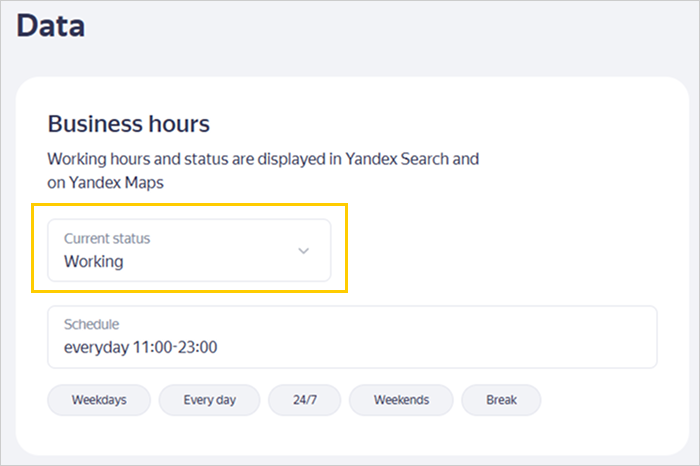
Under Current status, select Working.
What it looks like:
-
Click Save changes at the bottom of the page.
-
Find the business in Yandex Maps.
-
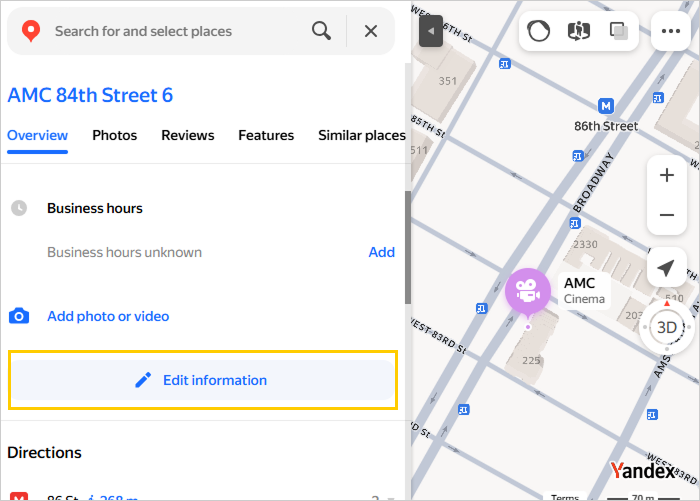
Under Overview in the company profile, click
 Edit information.
What it looks like:
-
Select Re-opened.
-
Optional. Add a comment and photos.
-
Click Submit.
-
Find the business in the Yandex Maps app.
-
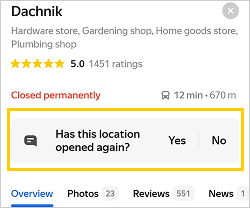
Under Has this location opened again?, select Yes.
What it looks like:
The status of the business will change after the data is checked.