Weekly budget
How it works
The strategy tries to maintain the given weekly budget, distributing it across the calendar week from Monday to Sunday. The budget may be spent unevenly throughout the week, but the weekly limit won't be exceeded. The campaign won't exceed the weekly budget unless there's a budget reset.
Budget distribution depends on your time targeting settings. For example, if you limit ad impressions to two days a week, your budget will only be distributed over those two days.
If the budget is underspent, this is usually a sign of ineffective keywords, insufficient funds in the account, a low maximum bid, or low CPA.
Maximum daily expenditure
The maximum daily expenditure is calculated based on Moscow Time (UTC+3) and depends on the number of days in the impression schedule, taking into account your holidays settings.
Maximum daily budget:
-
If the schedule is for 1 day: Up to 100% of your weekly budget plus any unused budget carried over from the previous week.
-
If the schedule is for 2 days: Up to 50% of your weekly budget plus any unused budget carried over from the previous week.
-
If the schedule is for 3 days or more, or if there are no schedule limits: Up to 35% of your weekly budget plus any unused budget carried over from the previous week.
Budget limits and recommendations
The minimum weekly budget is RUB 300 (see other currencies).
For optimal strategy performance, we recommend setting your budget as follows:
- "Maximize revenue" — at least 10 × profit per conversion per week.
- "Maximize conversions" — at least 10 × CPA.
Weekly budget reset
Campaign expenditures are reset when you:
-
Change the weekly budget.
-
Change the payment model.
-
Postpone the campaign's start date, including cases where the end date, which has already passed, is postponed to a later date, causing the campaign to restart.
All other changes (such as re-launching a stopped campaign or changing the strategy, limit type, CPC, or conversion settings) don't trigger a budget restart.
How resetting affects your budget spending
If you change the weekly budget:
-
In pay-per-click strategies, the maximum spending on this day can be 35% of the old budget + 35% of the new one.
-
In pay-per-conversion strategies, 100% of the old + 100% of the new budget can be spent if all conversions are received in one day.
Let's say your campaign has a weekly budget of ₽7000. You spent ₽4000 from Monday to Thursday, on which you decided to change the budget to ₽5000. This resets budget expenditure, meaning the campaign can now spend up to ₽5000 more from Thursday to Sunday. If it's a pay-per-click campaign, on Thursday, you can spend up to 35% of the old + 35% of the new budget. And if it's a pay-per-conversion campaign, you can spend up to 100% of the old + 100% of the new budget.
If you change the payment model:
- When switching from pay-per-conversion to pay-per-click, spending can be 100% of the weekly budget before the reset + 35% of the budget after the reset.
- When switching from pay-per-click to pay-per-conversion, spending can be 35% of the weekly budget before the reset + 100% of the new budget.
The same applies to other actions that reset budget expenditures.
When it's optimal time to change your weekly budget
To avoid overspending, adjust your budget at the beginning of the calendar week. If you change the budget amount in the middle of the week, previous spending isn't taken into account.
Tip
Don't change your weekly budget too often. Each budget change in the strategy resets your spending, which can lead to further overspending.
Setting the minimum budget
In "Maximize revenue" and "Maximize conversions" pay-per-click strategies with a limit on CPA or cost revenue ratio, you can set a minimum weekly budget. The algorithm will calculate a recommended value based on the strategy settings. Alternatively, you can set a custom value.
Partial carryover of unused budget
Campaigns with pay-per-click strategies support partial carryover of unused budget to the following week. If your campaign spends less than its weekly limit, the strategy carries over the unused portion to the next week (up to 30% of your weekly budget).
This feature ensures you stay on track for your planned traffic volume during periods of lower demand and helps you adapt to market changes without exceeding your spending limits.
How budget carryover works
-
Budget carryover isn't active during the first week of your campaign. The system begins calculating and applying carryover from the second week onwards.
-
Unused funds don't accumulate. Only the amount unspent from the previous week can be carried over, up to a maximum of 30% of your weekly budget.
-
The system spends the carried‑over amount first and only then begins using the main budget for the new week.
-
Your weekly budget does not increase. Total spending for the week can reach up to 130% of your set budget, but only by applying the unused funds from the previous week.
When calculating the maximum daily expense, the system factors in both your set weekly budget and any unused budget carried over from the previous week. This is why the formulas above use the sum of these two values.
-
Information about the carryover will appear at the start of each new week on the Campaigns page, within the Budget and strategy column.
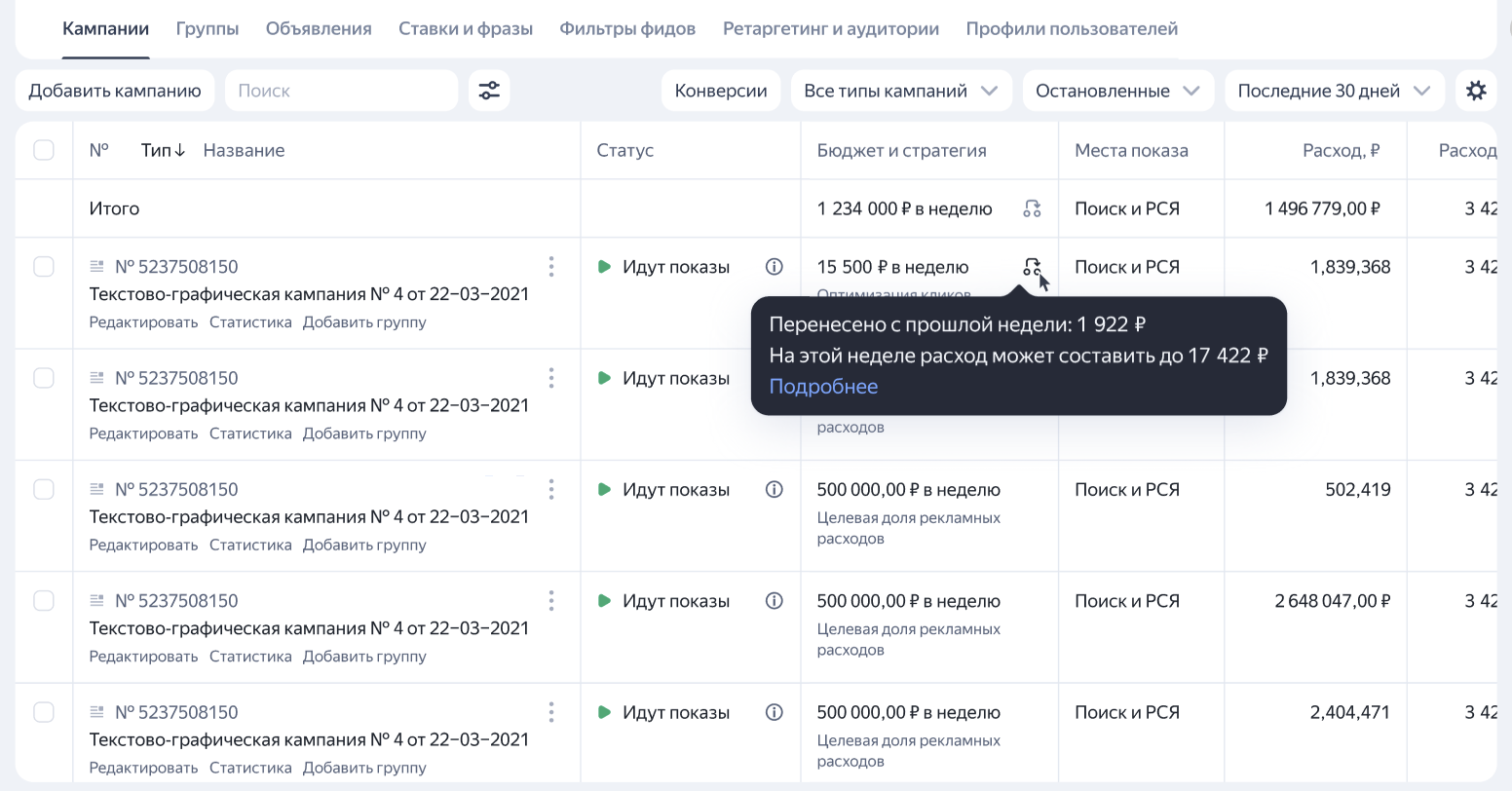
Carryover of unused funds doesn't trigger strategy retraining and doesn't restart your budget.
Example of budget carryover
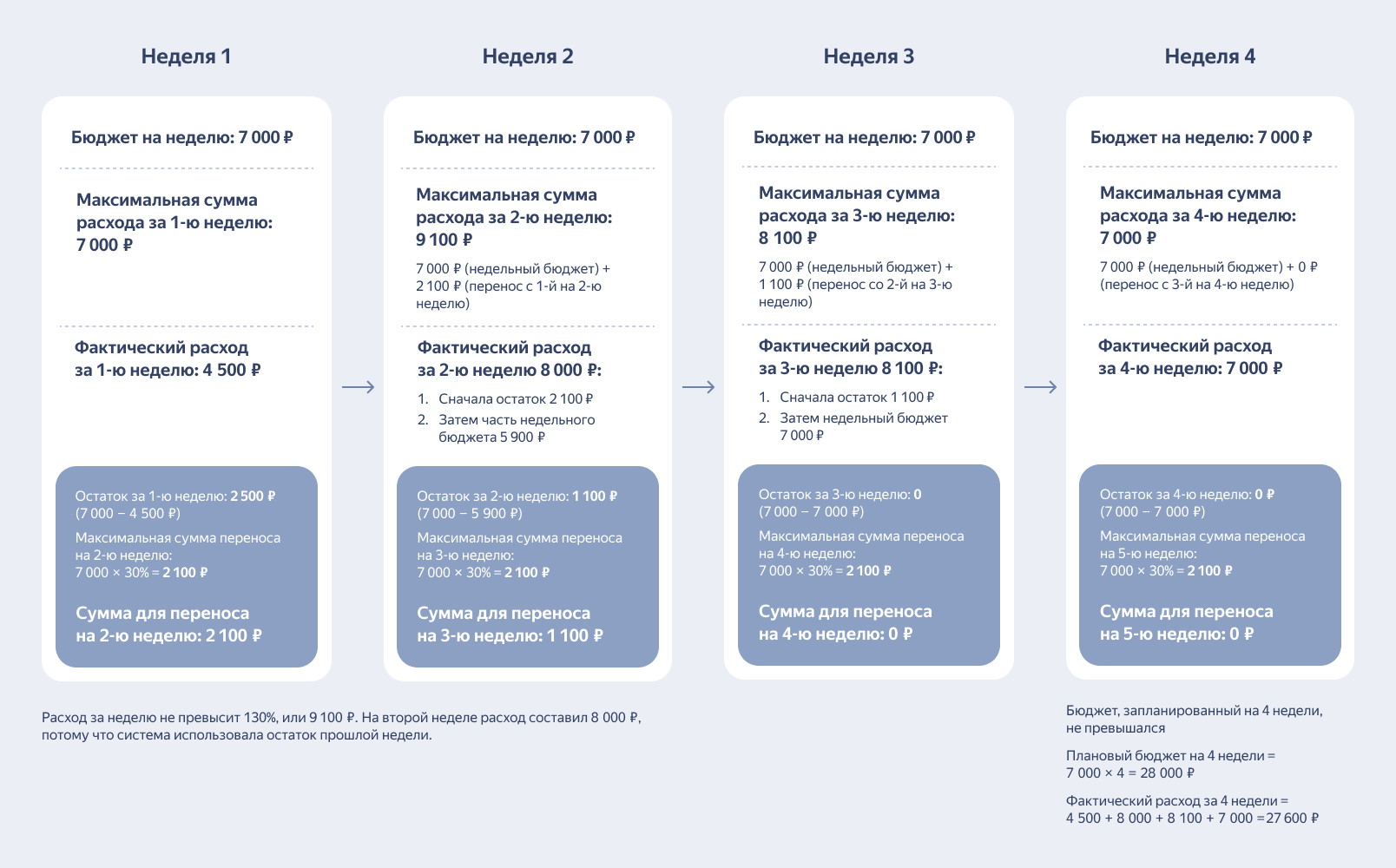
How to plan and manage your budget with carryover
When running campaigns with strict media plans, budget carryover helps you automate the allocation of unused funds. This eliminates the need to manually adjust your budget during natural dips in demand, such as weekends or holidays, while keeping you in full control of campaign spending.
Your set weekly budget serves as the primary baseline. If your campaign doesn't spend its full weekly budget, the system automatically carries over some of the remaining funds to the following week, but no more than 30% of the weekly budget. Even with this carryover, your actual spending over multiple weeks will never exceed the total planned budget for that period. This means you can enter your true target amounts without needing to set up additional buffers for demand fluctuations. The system manages your spending to ensure your campaign stays on plan.
How to evaluate results and generate reports
To see how the spending adds up, let's look at the entire carryover cycle. It starts with the week of underspending and ends once your total actual spending aligns with your planned budget.
Let's say your weekly budget is 10,000 rubles. If a dip in demand occurs during the first week, the carryover cycle continues until your actual spending catches up to your original plan, which, in our example, happens by the fourth week:
|
Evaluation period |
Set weekly budget |
Planned budget (cumulative) |
Actual spending |
Status |
|
1 week |
10,000 |
10,000 |
7000 |
Demand dip, 3000 carried over |
|
2 weeks |
10,000 |
20,000 |
17,000 |
Using carryover and partial budget |
|
3 weeks |
10,000 |
30,000 |
27,000 |
Using carryover and partial budget |
|
4 weeks |
10,000 |
40,000 |
40,000 |
Carryover and budget fully spent |
|
5 weeks |
10,000 |
50,000 |
50,000 |
Spending aligned with your plan |
As you can see from the example, your cumulative spending remains within your planned budget throughout every stage. The carryover feature simply reallocates any previously unspent funds within the cycle.
How to keep your spending within limits
When campaigns have a fixed budget for a set period (like a calendar month), combine account-level spending limits with either weekly campaign budgets or a fixed budget for the period.
- Weekly budgets let your campaigns reach more customers during high-demand days, as our algorithms automatically use unspent funds from previous periods to drive extra traffic.
- Use account-level spending limits to manage your total costs. Unlike campaign budgets, the carryover mechanism doesn't apply here. Once your total costs reach the set value, your account ads will be paused.
This strategy lets you enjoy the flexibility of weekly budgets while staying in control of account-wide spending.
Have questions?
Alert
Our customer support can only assist you with campaigns linked to the username you are contacting us from. You can check your username by opening ya.ru in another browser tab. Our team can access your data only when processing your request.
Scan the QR code or tap it to follow the link.

When choosing Telegram, please note that Yandex does not control or take responsibility for how third-party messaging apps store your data and chat history.
Useful links
Legal documents
Training
Learn more
|
Payment currency |
Minimum weekly budget |
|
RUB |
300 |
|
KZT |
1 300 |
|
BYN |
9 |
|
USD |
10 |
|
EUR |
10 |
|
CHF |
10 |
|
TRY |
17 |