Dönemlerin karşılaştırılması
Raporlarda aynı anda iki dönemin verilerini görebilirsiniz. Bunun için Karşılaştırma butonuna tıklayın ve sunulan dönemlerden birini seçin ya da kendi döneminizi belirtin. Bu ayarlar aynı zamanda raporları kaydetme sırasında da dikkate alınır: örneğin, "hafta başına hafta sonu" karşılaştırmasıyla bir rapor oluşturabilirsiniz, onu kaydedebilir ve Raporlarım bölümünden açabilirsiniz.
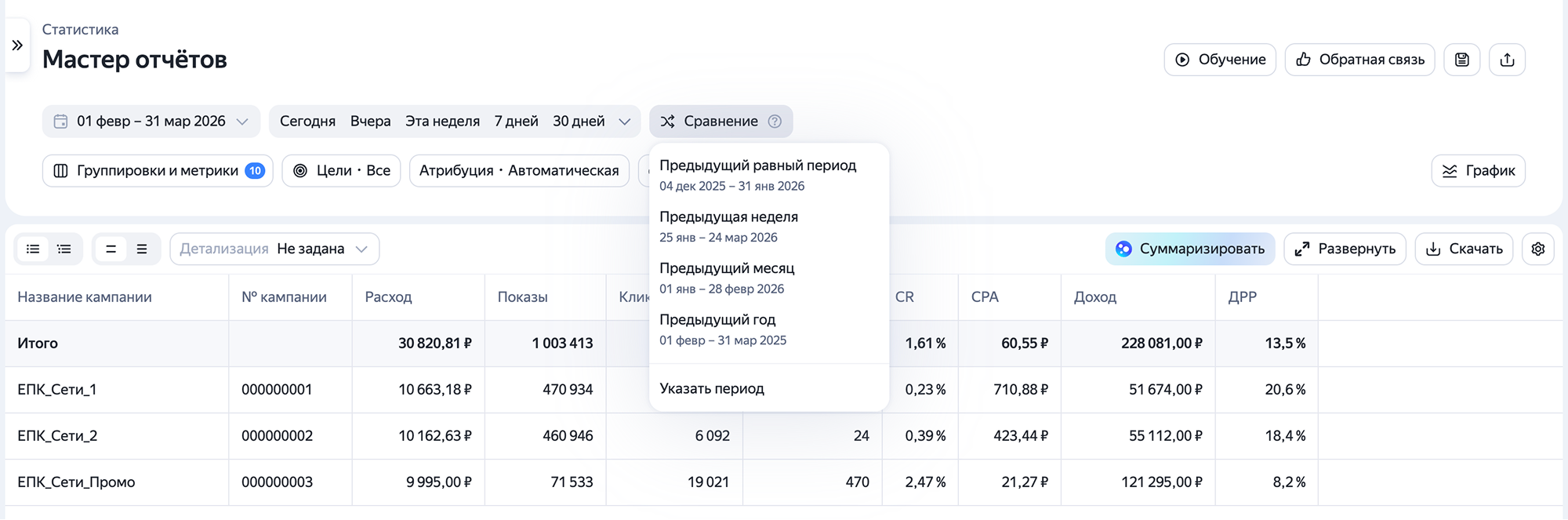
Varsayılan olarak karşılaştırma için mevcut:
-
Önceki eşit dönem;
-
Geçen hafta;
-
Önceki ay;
-
Geçen yıl.
Karşılaştırma dönemlerini ayarlamakta keyfi aralıklar seçebilir ve tarih kesişimlerini ve sıralamayı kısıtlamazsınız. Gerekirse bir tıkla karşılaştırma dönemlerini yer değiştirebilirsiniz  .
.
Öneri
Eğer büyük veri hacimleriyle çalışıyorsanız, sütunu sabitleyin; böylece gerekli istatistikler yatay kaydırma sırasında raporda görüntülenir.
Video görüntüleme
Başka sorunuz var mı?
Dikkat
Müşteri Hizmetleri uzmanı, siz hangi kullanıcı adından iletişime geçtiyseniz yalnızca o kullanıcı adından başlatılmış olan kampanyalarla ilgili danışmanlık verebilir. Kullanıcı adı, ya.ru’yu komşu tarayıcı sekmesinde açarsanız görülebilir. Uzman, verilerinize yalnızca talebi işlerken erişebilecektir.
QR kodunu tarayın veya bağlantıya gitmek için koda tıklayın.