Accompanying documents
Accompanying documents are a set of documents that describes and regulates the process of cargo transportation. It contains all information about the product and its movement.
With electronic document management
The sale of goods to a business with an EDI is formalized by a universal transfer document (UPD). For sellers on the simplified and general taxation systems, the UPD-2 is formed. It contains the names and details — yours and the buyer's, the number of shipped goods, the total cost of the order, as well as the amount of tax if you work for the main.
If the buyer makes a refund, a universal correction document (UKD) is formed.
The signing process
When you make a deal on the marketplace, all the accompanying documents are drawn up and electronically [signed for you] (*signed for you) Yandex Market. He sends them to you twice: without signatures and with electronic signatures of both parties.
First, the documents are formed without signatures: UPD — at the moment when the order was shipped from the warehouse and delivered, UKD — when the Market accepted the goods returned by the buyer in its warehouse. When they are formed, the Market immediately sends them to your personal account. They can be used for accounting purposes.
Then these documents are electronically signed by the Market, transferred to the electronic signature of the buyer, receives them back and sends them to you. It is the signed documents that confirm that the document flow between you and the buyer has been completed, and they will be useful for tax or audit checks. In the digital archive, with a set of signed documents, in addition to the UPD and UKD, there is also a document transfer protocol.
Without electronic document management
The sale of goods to a business without an EDO is issued by a consignment note in electronic form. It contains the names and details — yours and the buyer's, the number of shipped goods and the total cost of the order. For sellers, an invoice is also generated on the general taxation system, which indicates the amount of tax.
An example of an electronic bill of lading and an invoice
|
Bill of lading |
The invoice |
|
|
|
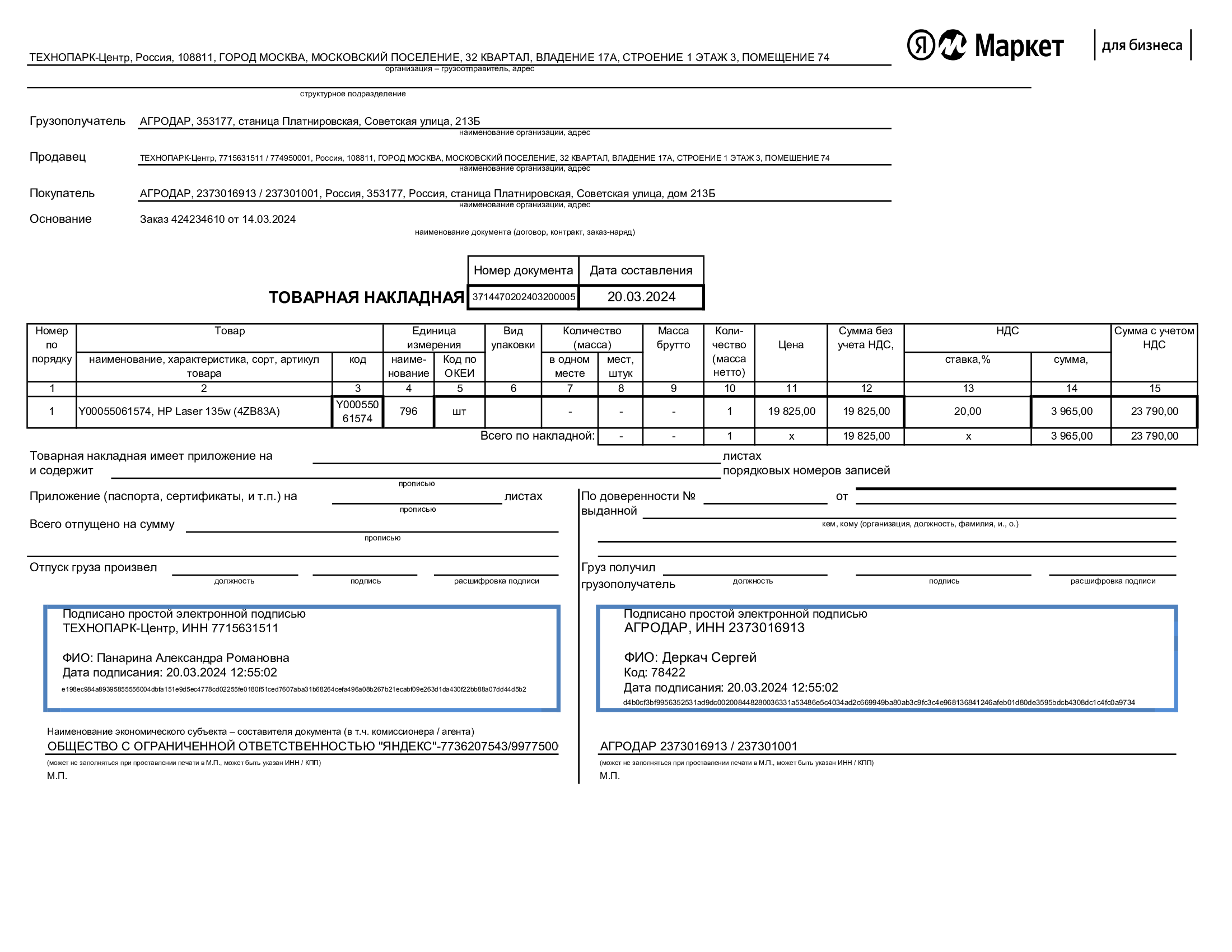
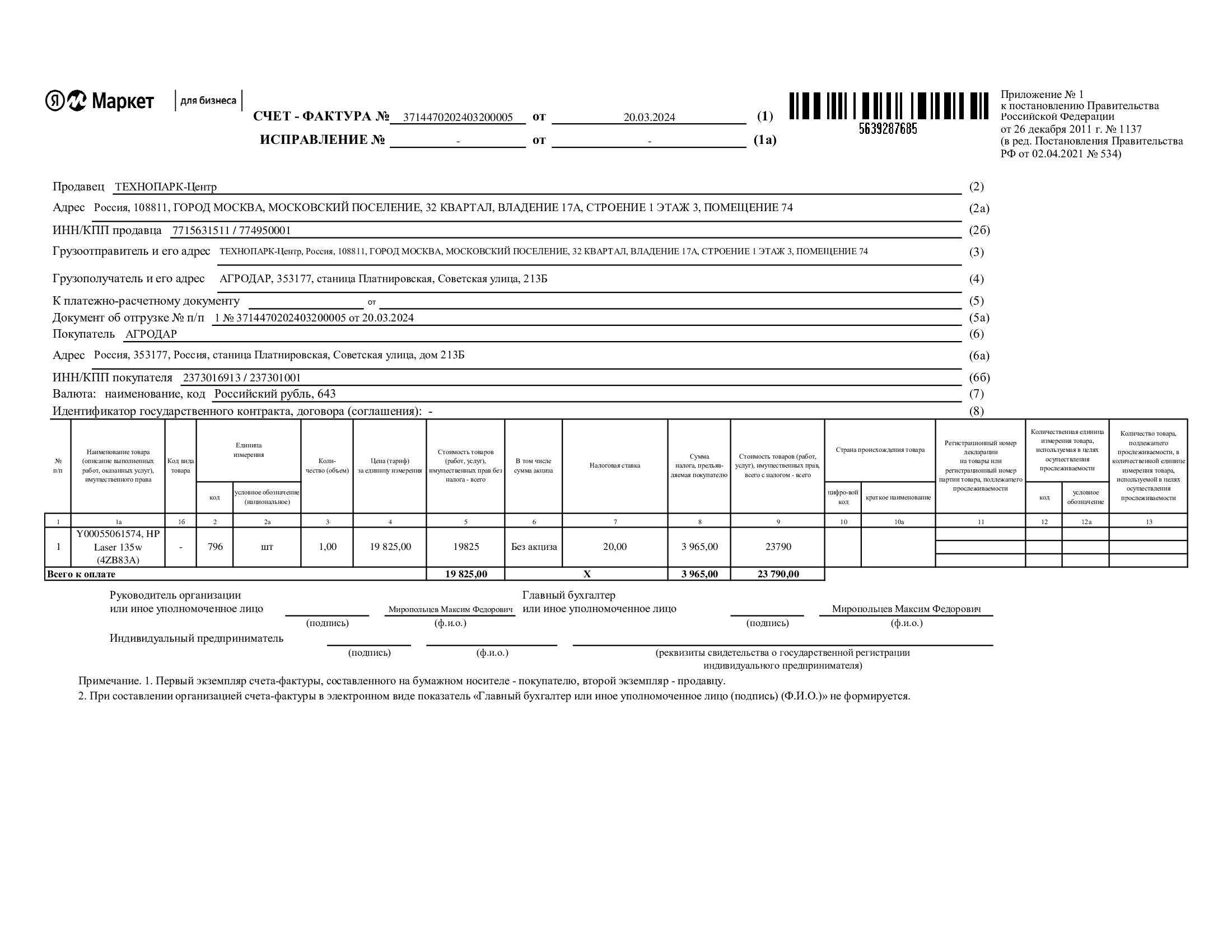
If the buyer makes a refund, an adjustment invoice (CSF) is generated.
The signing process
When you make a deal on the marketplace, all the accompanying documents are drawn up and [signed for you](*signs for you) Yandex Market. He sends them to you twice: without signatures and with signatures from both sides.
An invoice (if you work for OSN) in electronic form is first generated without signatures (when the order has been shipped from the warehouse and delivered).
The consignment note is created and signed by both parties simultaneously at the time of receipt of the order by the buyer, when he puts his [simple electronic signature] (*simple electronic signature).
As soon as the documents are ready, the Market immediately uploads them to your personal account. From there, they can already be used for accounting.
The invoice (if you work for OSN) in paper form with the signature of the Market is sent to you and the buyer by mail.
The adjustment invoice (if the buyer returned the order) is signed when the Market has accepted the returned goods in its warehouse, and is also sent in paper form by mail.
It is the signed documents confirm that the document flow between you and the buyer has been completed, and will be useful for tax or audit checks.
How to work for sellers on OSN and USN
For all sellers with EDO, the Market issues an UPD-2 by default, indicating the rate and amount of VAT.
At the same time, it is indicated on your product card that the buyer cannot accept VAT deduction. By placing an order for such goods and concluding a delivery agreement with you, the buyer agrees not to receive an invoice (in accordance with clause 3 of Article 169 of the Tax Code of the Russian Federation). You remain a VAT payer and must keep records in accordance with current legislation.
Please note: The Market does not check or control the tax status of the buyer.
What does the product look like for which the buyer cannot receive a VAT deduction

Note
UPD-2 replaces the consignment note (form no. TORG-12), and UPD-1 replaces the consignment note (form no. TORG—12) and the invoice for the advance payment.
You can switch to the standard operating scheme. Then your customers will be able to refund VAT on the general taxation system, and the Market will issue an UPD-1 for you if the buyer uses an EDI, or an electronic consignment note and an invoice if he does not use it. In the cabinet, click on the name of your business in the lower left corner, select Legal data and find the section The store's audience. Click To change and choose UPD-1.
How to get the accompanying documents
The documents are coming in the office, by EDO or by mail — depending on whether the buyer uses EDO.
Note
If you notice an error in the accompanying documents, write to the support service in the office: Communication → Support → Create a request → Settlements and documents.
How to choose the length of the UPD number
The UPD number can consist of 12 or 18 characters. You can choose a convenient option in your account: click Legal data → Store audience → How many characters are in the UPD and select the desired number.
Questions and answers
How do I sign the accompanying documents from our side?
You don't need to do this. — Yandex Market signs the documents are for you.
If I work in 1C, do I need to create a new counterparty for each buyer — a legal entity on the Market?
If a company or sole proprietor places an order with you for the first time, you need to create a new counterparty in your accounting system. The details of the buyer can be found from the duplicate of the UPD.
If the business does not order from you for the first time, you do not need to register a new counterparty.
Does money for business orders come from the Market or from the buyer?
From the Market.
Which report shows sales to a business?
In reports on payments, sales of goods and orders. There is a special block in the implementation report Sales to businesses. It contains the legal details of the buyer and the documents sent. You can use this data for accounting purposes.
Can the Market change the UPD number at the request of the seller?
No.
Will the Market issue an invoice for an advance payment?
Yes, the Market can issue an invoice in two cases:
- if the payment from the buyer was received in one quarter, and the order was shipped from the Market warehouse in the next quarter,
- if more than five calendar days have passed between the payment of the order and shipment from the Market warehouse.
If you need an invoice for an advance payment, write to the support service in the office: Communication → Support → Create a request → Settlements and documents. The Market will send you an EDI document no later than the 15th day of the next month after receiving the payment.
Is it possible to refuse to sell to a business?
Yes. To change the store's audience, contact customer support.
The Market signs the accompanying documents for you based on Conditions which you sign by placing products on the showcase business.market.yandex.ru. These powers are enshrined in the Paragraph 7.1
A simple electronic signature (PEP) is a combination of the entered username, password and confirmation code received in an SMS to the number linked to the account. When using the PEP, a separate signature file is not formed — information about who signed the document and when is contained in the consignment note itself.
Please note that the person who was indicated by the buyer at the checkout stage will be entered in the "Recipient" column.
According to clause 5 of Article 9 of the law "On Accounting" dated 06.12.2011 N 402-FZ, Article 9 of the law "On Electronic Signature" dated 06.04.2011 N 63-FZ, as well as The rules of use of the Yandex Market service, clause 8.5.2 Conditions for placing Product offers on the Yandex Market for Business Marketplace (FBY model), clause 9.5.2. Terms of placement of Product offers on the Yandex Market for Business Marketplace (FBS model).
Open the page Orders → Orders and Shipments and click on the order number. Scroll down the page to the very end, click Documents for the order and choose Universal Transfer Document (UPD) or Adjustments (UKD/CSF).
The Market signs the accompanying documents for you based on Conditions which you sign by placing products on the showcase business.market.yandex.ru. These powers are enshrined in the Paragraph 7.1